Outline
- Ch3: Template (part 2)
- Ch4: Web Form
- Ch5: Email
Ch3: Template (part 2)
url_for parameter: _external
- True: return an absolute URL
- False: return an relative URL (default)
In [ ]:
url_for("index") # "/"
url_for("index", _external=True) # "http://127.0.0.1:5000/"
Dynamic URLs can be generated by passing the dynamic parts as keyword arguments.
In [ ]:
url_for("user", name="maomao", _external=True) # "http://127.0.0.1:5000/user/maomao"
The function will add any extra arguments to the query string.
In [ ]:
url_for("index", page=2, _external=True) # "http://127.0.0.1:5000/?page=2"
Modify <a href="/"> by url_for()
In [ ]:
<!-- templates/base.html -->

{% extends "bootstrap/base.html" %}

{% block title %}Flasky{% endblock %}

{% block navbar %}
<div class="navbar navbar-inverse" role="navigation">
    <div class="container">
        <div class="navbar-header">
            <button type="button" class="navbar-toggle"
            data-toggle="collapse" data-target=".navbar-collapse">
                <span class="sr-only">Toggle navigation</span>
                <span class="icon-bar"></span>
                <span class="icon-bar"></span>
                <span class="icon-bar"></span>
            </button>
            <a class="navbar-brand" href="{{ home }}">Flasky</a>
        </div>
        <div class="navbar-collapse collapse">
            <ul class="nav navbar-nav">
                <li><a href="{{ home }}">Home</a></li>
            </ul>
        </div>
    </div>
</div>
{% endblock %}

{% block content %}
<div class="container">
    {% block page_content %}{% endblock %}
</div>
{% endblock %}
In [ ]:
<!-- templates/user.html -->

{% extends "base.html" %}

{% block title %}Flasky - Welcom{% endblock %}

{% block page_content %}
<div class="page-header">
    <h1>Hello, {{ name }}!</h1>
</div>
{% endblock %}
In [ ]:
from flask import url_for

@app.route("/user/<name>")
def user(name):
    home = url_for("index", _external=True)
    return render_template("user.html", name=name, home=home)
Result

Problem
- Each view func needs to provide 'home' variable to render template
Solution
- url_for() can also be used in template
In [ ]:
<!-- templates/base.html -->

{% extends "bootstrap/base.html" %}

{% block title %}Flasky{% endblock %}

{% block navbar %}
<div class="navbar navbar-inverse" role="navigation">
    <div class="container">
        <div class="navbar-header">
            <button type="button" class="navbar-toggle"
            data-toggle="collapse" data-target=".navbar-collapse">
                <span class="sr-only">Toggle navigation</span>
                <span class="icon-bar"></span>
                <span class="icon-bar"></span>
                <span class="icon-bar"></span>
            </button>
            <a class="navbar-brand" href="{{ url_for('index', _external=True) }}">Flasky</a>
        </div>
        <div class="navbar-collapse collapse">
            <ul class="nav navbar-nav">
                <li><a href="{{ url_for('index', _external=True) }}">Home</a></li>
            </ul>
        </div>
    </div>
</div>
{% endblock %}

{% block content %}
<div class="container">
    {% block page_content %}{% endblock %}
</div>
{% endblock %}
Static files
- Images, CSS, javascript
- References to static files are treated as a special route defined as /static/
<filename>- You can check out the url_map
- By default, flask looks for static files in a subdirectory called 'static' located in the application’s root folder.
In [ ]:
<!-- templates/base.html -->

{% extends "bootstrap/base.html" %}

{% block title %}Flasky{% endblock %}
{% block head %}
{{ super() }}
<link rel="shortcut icon" href="{{ url_for('static', filename='favicon.ico') }}" type="image/x-icon">
<link rel="icon" href="{{ url_for('static', filename='favicon.ico') }}" type="image/x-icon">
{% endblock %}

{% block navbar %}
<div class="navbar navbar-inverse" role="navigation">
    <div class="container">
        <div class="navbar-header">
            <button type="button" class="navbar-toggle"
            data-toggle="collapse" data-target=".navbar-collapse">
                <span class="sr-only">Toggle navigation</span>
                <span class="icon-bar"></span>
                <span class="icon-bar"></span>
                <span class="icon-bar"></span>
            </button>
            <a class="navbar-brand" href="{{ url_for('index', _external=True) }}">Flasky</a>
        </div>
        <div class="navbar-collapse collapse">
            <ul class="nav navbar-nav">
                <li><a href="{{ url_for('index', _external=True) }}">Home</a></li>
            </ul>
        </div>
    </div>
</div>
{% endblock %}

{% block content %}
<div class="container">
    {% block page_content %}{% endblock %}
</div>
{% endblock %}
Before
.png### After

You can get the above code from github
$git clone https://github.com/win911/flask_class.git- Skip this if you have done it before.
$git checkout 35d00b
How to change the static folder?
- static_folder: Default is 'static'
In [5]:
from flask import Flask
app = Flask(__name__, static_folder="my_static")
Flask extension
Localization of Dates and Times with Flask-Moment
- Integrates moment.js into Jinja2 templates
moment.js
- Client-side open source library written in JavaScript that renders dates and times in the browser.
- Server sends UTC to browser.
- Browser converts UTC to local time.
Because users work in different parts of the world, server needs uniform time units.
- We often use UTC to stardardize the time and date.
Installation
- pip install flask-moment
Note
- Flask-Moment depends on jquery.js in addition to moment.js.
- Need to inlcude them both in the HTML document.
- Boostrap alreday includes jquery.js, so we only need to include moment.js.
How to render date and time in template
- We need to pass a date and time variable to the template for rendering.
- Flask-Moment provides a
momentclass varialble to tempaltes for rendering. format('LLL')determines the rendering style, from 'L' to 'LLLL'.L: Month numeral, day of month, year (EX: 08/27/2017)LL: Month name, day of month, year (EX: August 27, 2017)LLL: Month name, day of month, year, time (EX: August 27, 2017 5:32 PM)LLLL: Day of week, month name, day of month, year, time (EX: Sunday, August 27, 2017 5:37 PM)
In [ ]:
<!-- templates/index.html -->

{% extends "base.html" %}

{% block title %}Flasky - Index{% endblock %}
{% block scripts %}
{{ super() }}
{{ moment.include_moment() }}
{% endblock %}

{% block page_content %}
<div class="page-header">
    <p>The local data and time is {{ moment(current_time).format('LLL') }}.</p>
    <p>That was {{ moment(current_time).fromNow(refresh = True) }}</p>
</div>
{% endblock %}
In [ ]:
# hello.py

from datetime import datetime

from flask import Flask, render_template
from flask_bootstrap import Bootstrap
from flask_moment import Moment
#from flask.ext.bootstrap import Bootstrap
#from flask.ext.moment import Moment

app = Flask(__name__)
bootstrap = Bootstrap(app)
moment = Moment(app)

@app.route('/')
def index():
    return render_template('index.html', current_time = datetime.utcnow())

if __name__ == "__main__":
    app.run(debug=True)
First view
.png### After two minutes
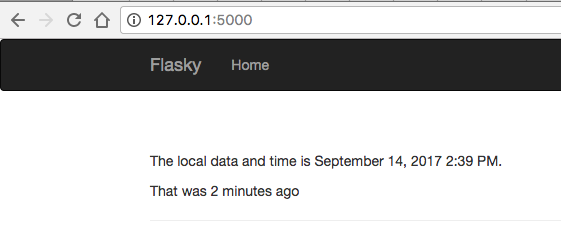
You can get the above code from github
$git clone https://github.com/win911/flask_class.git- Skip this if you have done it before.
$git checkout b0bcf5
Ch4: Web Form
Receive and process data from the web form
- Add methods parameter to app.route and tell flask which http methods should be handled.
- GET is the default method.
Use POST to receive data instead of GET for security reasons
- You can think of GET as a postcard and you can see the content directly.
- POST is like a letter with an envelope so you cannot see the content directly.
In [ ]:
# hello.py

from flask import Flask, request

app = Flask(__name__)

@app.route("/", methods=["GET", "POST"])
def index():
    if request.method == "POST":
        if request.headers["Content-Type"] == "application/json":
            return "<p>JSON Data: {}</p>".format(request.json)
        elif request.headers["Content-Type"] == "application/x-www-form-urlencoded":
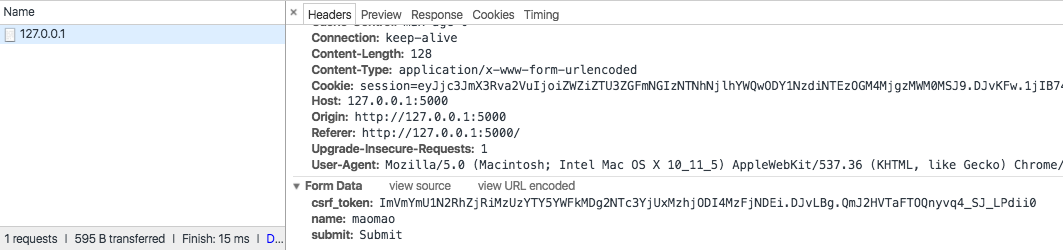
            return "<p>Form Data: {}</p>".format(request.form)

        return "<p>Other Types Data: {}</p>".format(request.data)

    return "<p>Hello</p>"

if __name__ == "__main__":
    app.run(debug=True)
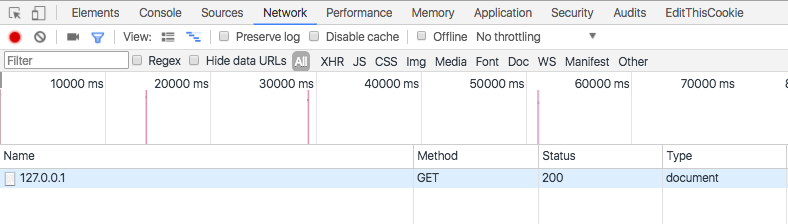
.png

.png

.png
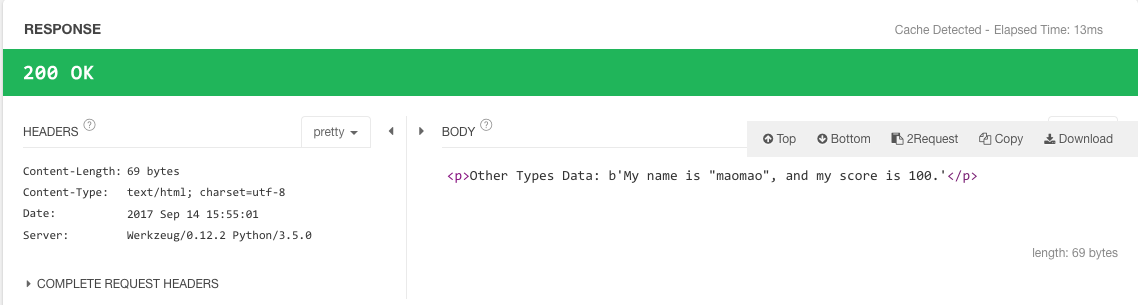
Flask extension
WTForms
- Generate the HTML code for forms.
- Validate the submitted form data.
Flask-WTF
- Wraps WTForms package and provides useful helper functions.
- Each web form is represented by a class that inherits from class
FlaskForm. - Fields and validators can be imported from WTForms.
Installation
- pip install flask-wtf
In [ ]:
<!-- tempaltes/index.html -->

{% if name %}
    <p>Hello, {{ name }}!</p>
{% else %}
    <p>Hello, Stranger!</p>
{% endif %}

<form method="POST">
{{ form.hidden_tag() }}    <!-- Important for CSRF token -->
{{ form.name.label }} {{ form.name() }}
{{ form.submit() }}
</form>
In [ ]:
# hello.py

from flask import Flask, render_template
from flask_wtf import FlaskForm
#from flask.ext.wtf import Form
from wtforms import StringField, SubmitField
from wtforms.validators import Required

app = Flask(__name__)
app.config["SECRET_KEY"] = "hard to guess string"    # Important for CSRF token

class NameForm(FlaskForm):
    name = StringField("What is your name?", validators=[Required()])
    submit = SubmitField("Submit")

@app.route("/", methods=["GET", "POST"])
def index():
    name = None
    form = NameForm()
    if form.validate_on_submit():
        name = form.name.data
        form.name.data = ""
    return render_template("index.html", form=form, name=name)

if __name__ == "__main__":
    app.run(debug= True)
.png
.png
.png
Display error messages if validation failed
In [ ]:
<!-- tempaltes/index.html -->

{% if name %}
    <p>Hello, {{ name }}!</p>
{% else %}
    <p>Hello, Stranger!</p>
{% endif %}

<form method="POST">
{{ form.hidden_tag() }}    <!-- Important for CSRF token -->
{{ form.name.label }} {{ form.name() }}
{{ form.submit() }}
</form>

{% for field in form.errors %}
    <p style="color:red">{{ field }}:</p>
    <ul>
    {% for detail in form.errors[field] %}
        <li style="color:red">{{ detail }}</li>
    {% endfor %}
    </ul>
{% endfor %}
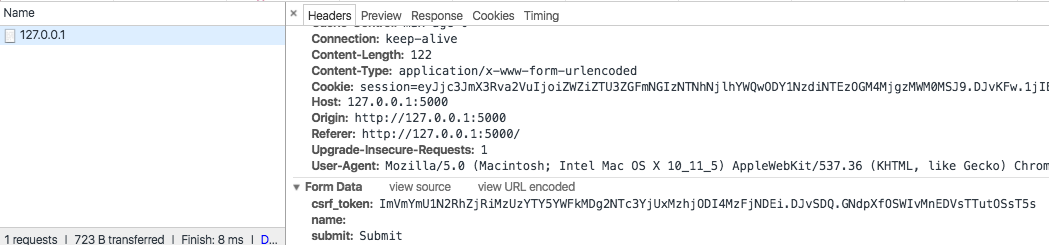
.png
.png
Improve the look of the form
Specify id or class attribute and define the css style
In [ ]:
<!-- tempaltes/index.html -->

{% if name %}
    <p>Hello, {{ name }}!</p>
{% else %}
    <p>Hello, Stranger!</p>
{% endif %}

<form method="POST">
{{ form.hidden_tag() }}    <!-- Important for CSRF token -->
{{ form.name.label }} {{ form.name(id='my-text-field', class='text-field') }}
{{ form.submit() }}
</form>

{% for field in form.errors %}
    <p style="color:red">{{ field }}:</p>
    <ul>
    {% for detail in form.errors[field] %}
        <li style="color:red">{{ detail }}</li>
    {% endfor %}
    </ul>
{% endfor %}
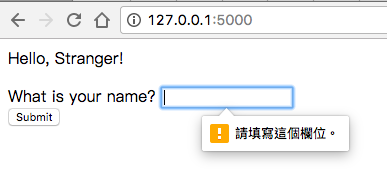
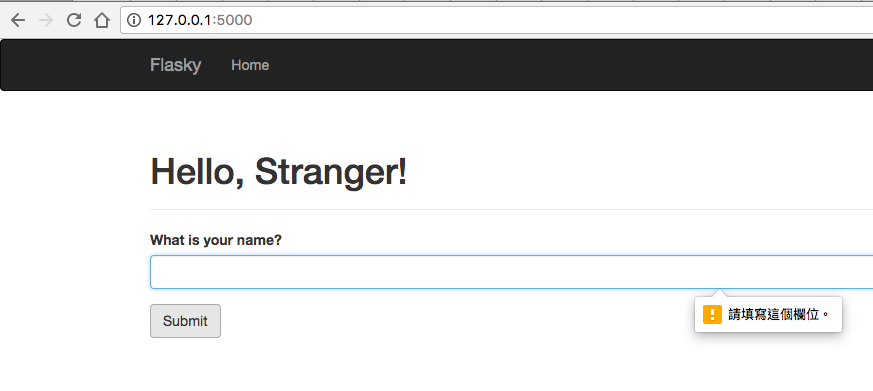
Use Flask-Bootstrap
- Generate HTML code.
- Display error messages if validation failed.
In [ ]:
<!-- tempaltes/index.html -->

{% if name %}
    <p>Hello, {{ name }}!</p>
{% else %}
    <p>Hello, Stranger!</p>
{% endif %}

{% import "bootstrap/wtf.html" as wtf %}
{{ wtf.quick_form(form) }}
In [ ]:
# hello.py

from flask import Flask, render_template
from flask_bootstrap import Bootstrap
from flask_wtf import FlaskForm
#from flask.ext.wtf import Form
from wtforms import StringField, SubmitField
from wtforms.validators import Required

app = Flask(__name__)
app.config["SECRET_KEY"] = "hard to guess string"    # Important for CSRF token
bootstrap = Bootstrap(app)

class NameForm(FlaskForm):
    name = StringField("What is your name?", validators=[Required()])
    submit = SubmitField("Submit")

@app.route("/", methods=["GET", "POST"])
def index():
    name = None
    form = NameForm()
    if form.validate_on_submit():
        name = form.name.data
        form.name.data = ""
    return render_template("index.html", form=form, name=name)

if __name__ == "__main__":
    app.run(debug=True)
In [ ]:
<!-- tempaltes/index.html -->

{% extends "base.html" %}
{% import "bootstrap/wtf.html" as wtf %}

{% block title %}Flasky{% endblock %}

{% block page_content %}
<div class="page-header">
    <h1>Hello, {% if name %}{{ name }}{% else %}Stranger{% endif %}!</h1>
</div>
{{ wtf.quick_form(form) }}
{% endblock %}
You can get the above code from github
$git clone https://github.com/win911/flask_class.git- Skip this if you have done it before.
$git checkout 42a607
Redirects & user sessions
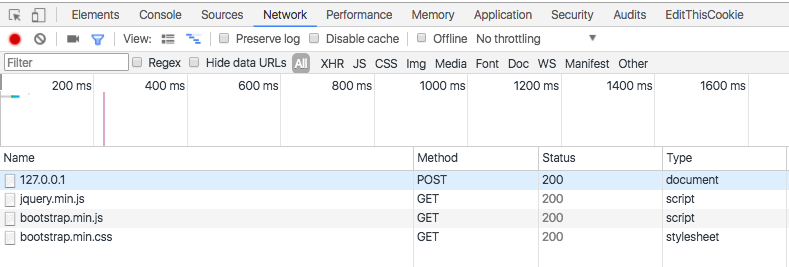
When you refresh the page, browsers repeat the last request they have sent
- When the last request sent is a POST request with form data, you may get a warning from the browsers.

We can solve the problem by using the following way
- Responding to POST requests with a redirect.
- The browser will issue a GET request for the redirect URL.
- We can store data from previous POST request in 'session' so that the GET request can use it.
By default, user sessions are stored in client-side cookies that are signed using the 'key'.
- app.config['SECRET_KEY']
Introduction to cookie and session
In [ ]:
from flask import session, redirect, url_for

@app.route("/", methods=["GET", "POST"])
def index():
    form = NameForm()
    if form.validate_on_submit():
        session["name"] = form.name.data
        return redirect(url_for("index"))
    return render_template("index.html", form=form, name=session.get("name"))
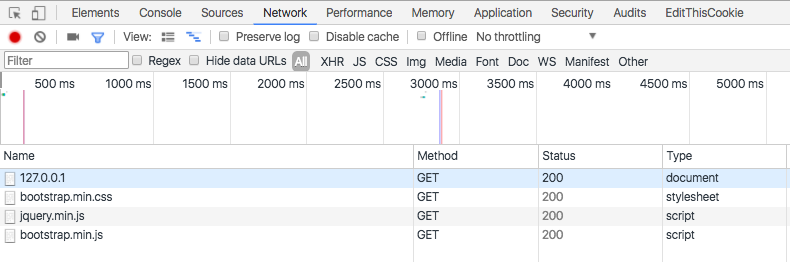
Refresh the page before using session and redirection
.png
Refresh the page after using session and redirection
.png
Message flashing
- To send confirmation message, warning, or error message to users.
In [ ]:
<!-- tempaltes/index.html -->
{% extends "base.html" %}
{% import "bootstrap/wtf.html" as wtf %}
{% block title %}Flasky{% endblock %}
{% block content %}
<div class="container">
{% for message in get_flashed_messages() %}
<div class="alert alert-warning">
<button type="button" class="close" data-dismiss="alert">×</button>
{{ message }}
</div>
{% endfor %}
{% block page_content %}
<div class="page-header">
<h1>Hello, {% if name %}{{ name }}{% else %}Stranger{% endif %}!</h1>
</div>
{{ wtf.quick_form(form) }}
{% endblock %}
</div>
{% endblock %}
In [ ]:
from flask import flash

@app.route("/", methods=["GET", "POST"])
def index():
    form = NameForm()
    if form.validate_on_submit():
        old_name = session.get("name")
        if old_name is not None and old_name != form.name.data:
            flash("Looks like you have changed your name!")
        session["name"] = form.name.data
        return redirect(url_for("index"))
    return render_template("index.html", form=form, name=session.get("name"))
.png
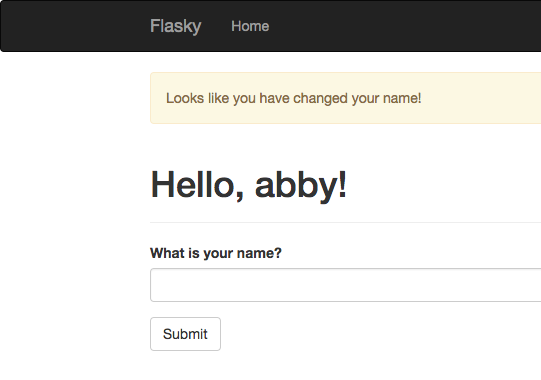
Flashed messages
- Stored in 'session'.
- Removed from 'session' when invoking get_flashed_messages().
You can get the above code from github
$git clone https://github.com/win911/flask_class.git- Skip this if you have done it before.
$git checkout 70179d
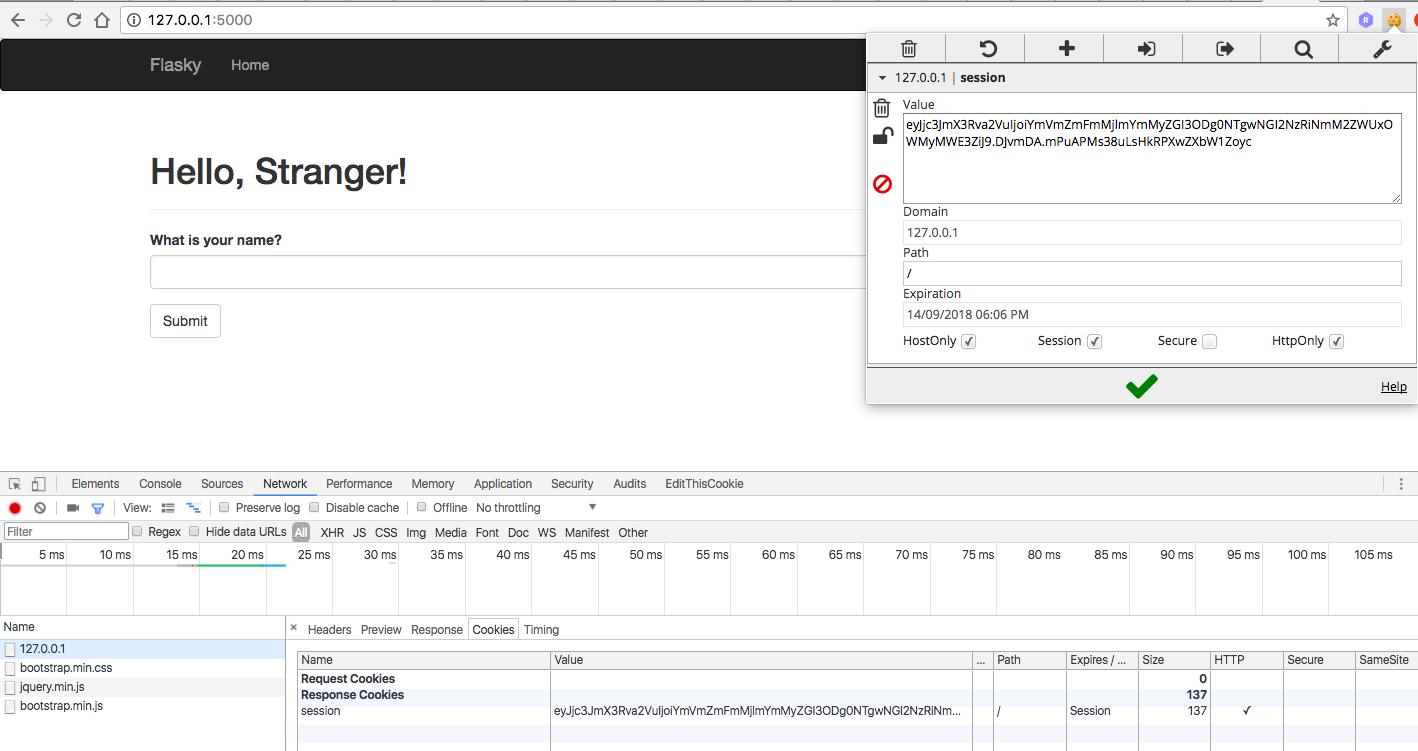
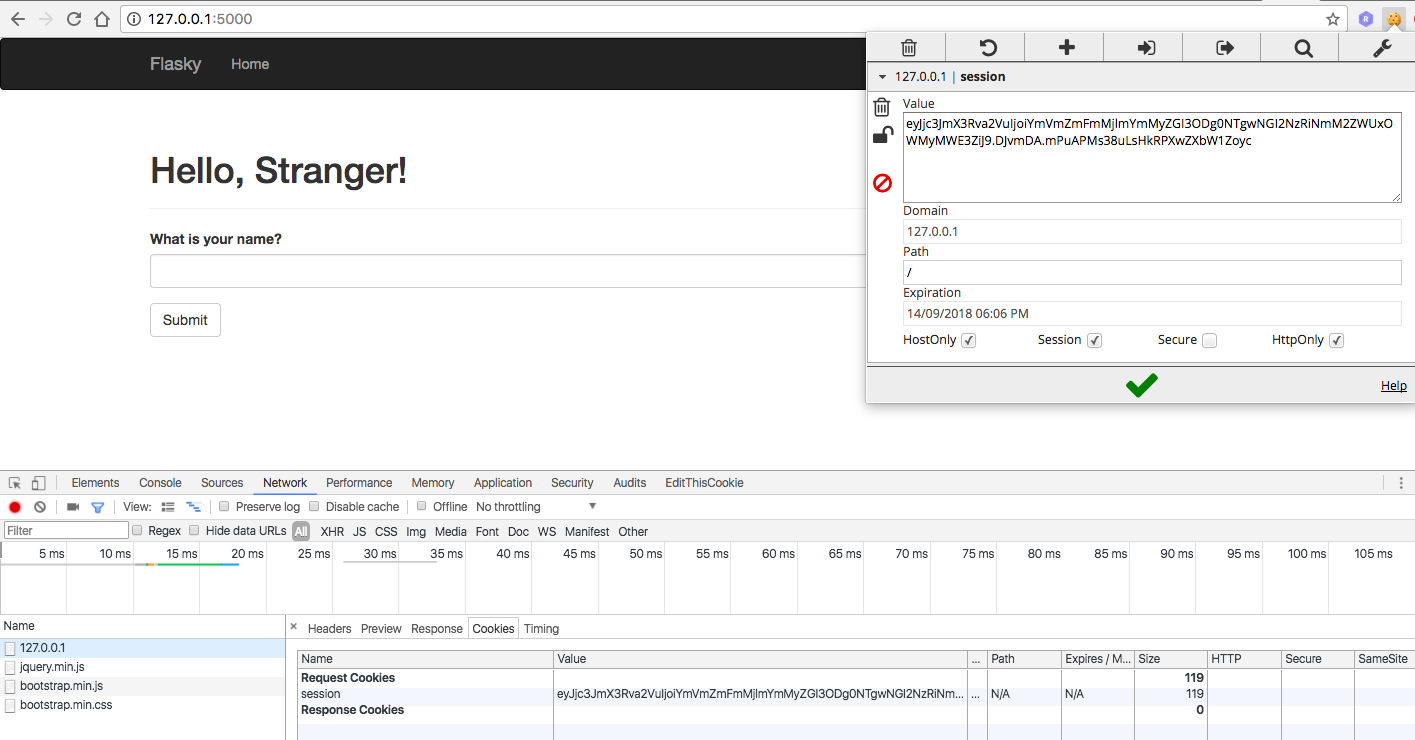
Survey the interaction between cookie and session
1. The first time you access this web site
- GET
- Browser gets session info from response.
- Browser stores session info in cookie.
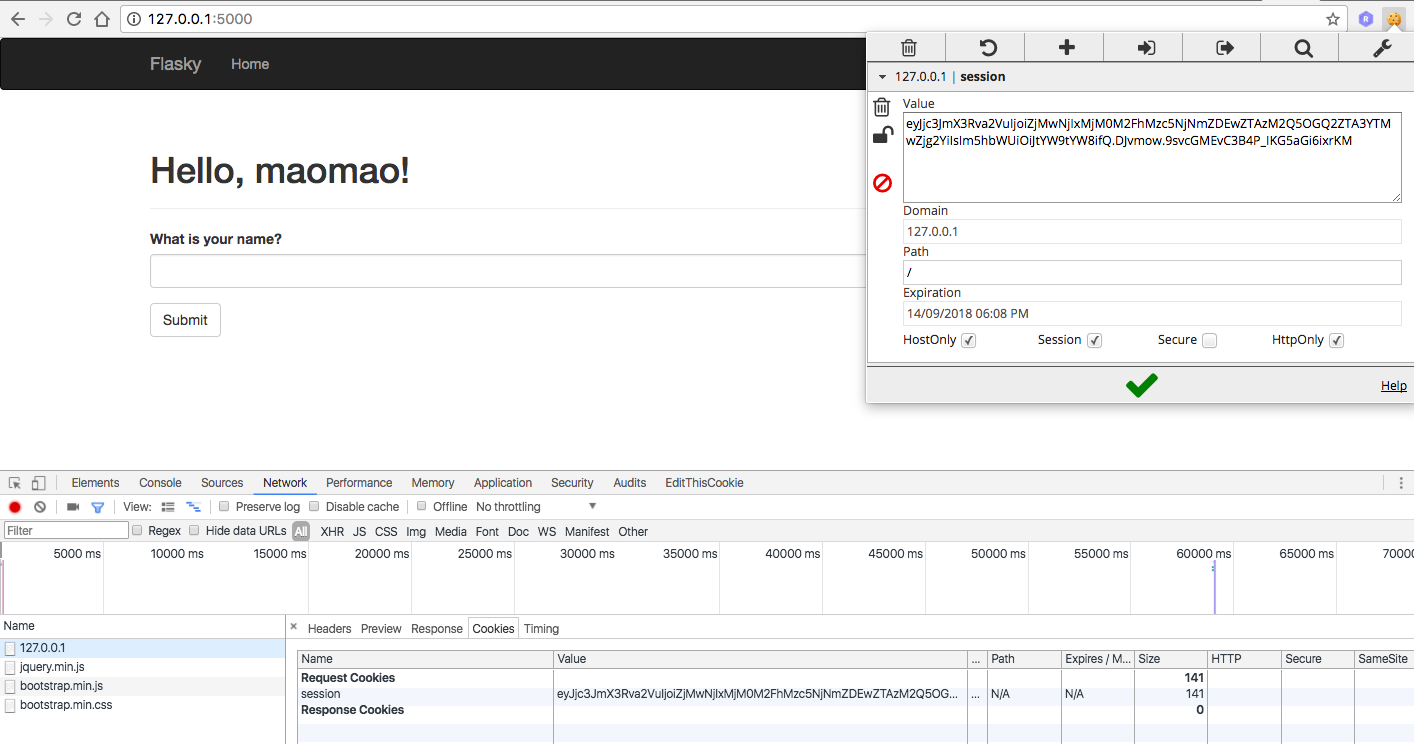
3. Submit "maomao" to server
- POST
- Server sotres {"name": "maomao"} in session.
- Browser gets new session info from response.
- Browser stores new session info in cookie.
- GET
- Browser sends new session info to server by request.
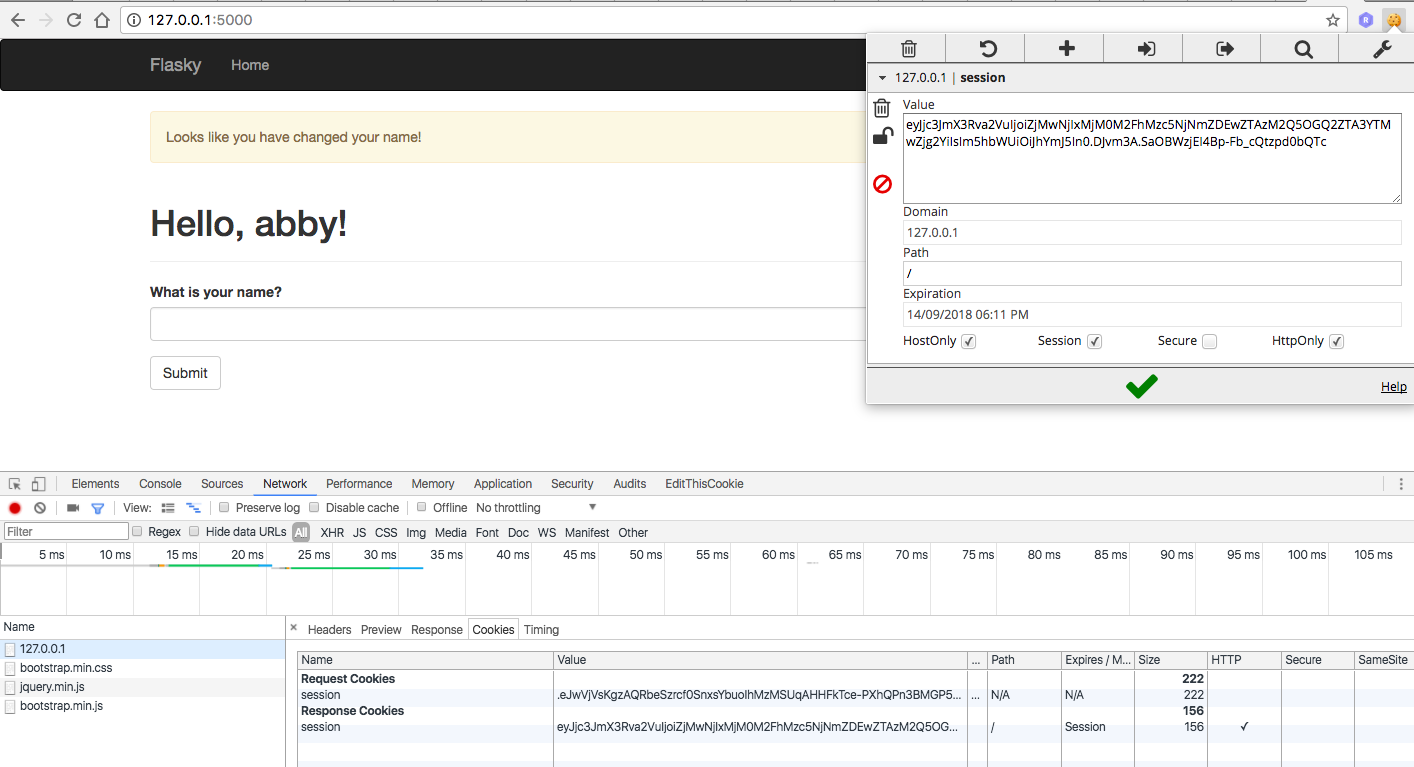
4. Submit "abby" to server
- POST
- Server sotres {"_flashes": ["Looks like you have changed your name!"], "name": "abby"} in session.
- Browser gets new session info from response.
- Browser stores new session info in cookie.
- GET
- Browser sends new session info to server by request.
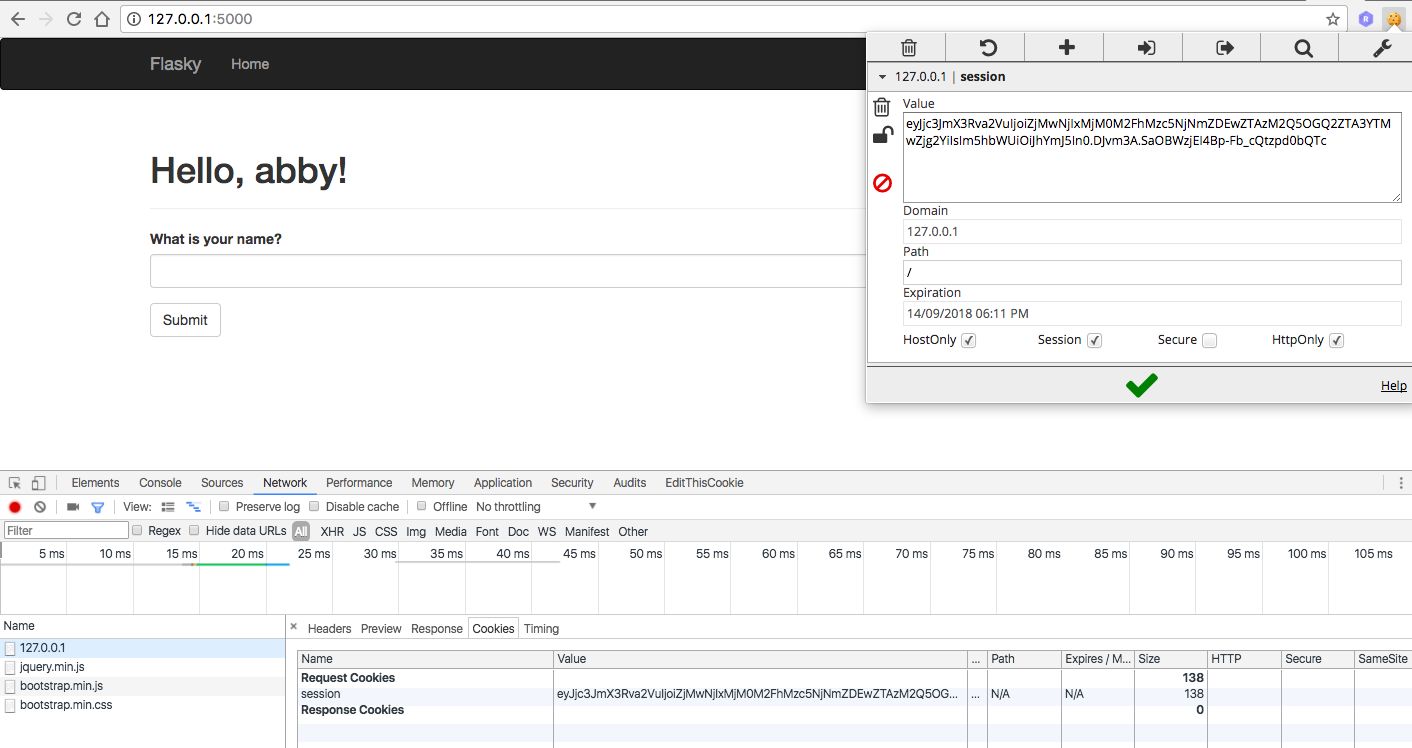
- Server remove flashed message from session because invoking get_flashed_messages().
- Browser gets new session info from response.
- Browser stores new session info in cookie.
Watch out !
- HTML comment does not work for jinja syntax, it will be still executed.
Ch5: Email
Flask extension
Email Support with Flask-Mail
- Wraps
smtpliband integrates it with Flask.
Installation
- $ pip install flask-mail
Flask-mail SMTP server configuration keys
| Key | Default | Description |
|---|---|---|
| MAIL_HOSTNAME | localhost | Hoastname or IP address of teh email server |
| MAIL_PORT | 25 | Port of the email server |
| MAIL_USE_TLS | False | Enable Transport Layer Security (TLS) secruity |
| MAIL_USE_SSL | False | Enable Secure Sockets layer (SSL) security |
| MAIL_USERNAME | None | Mail account username |
| MAIL_PASSWORD | None | Mail account password |
[Test] Send email through a Google Gmail account
1. Configure the application
In [ ]:
# hello_email.py

import os

from flask import Flask
from flask_mail import Mail
#from flask.ext.mail import Mail
from flask_script import Manager

app = Flask(__name__)

app.config['MAIL_SERVER'] = 'smtp.googlemail.com'
app.config['MAIL_PORT'] = 587
app.config['MAIL_USE_TLS'] = True
app.config['MAIL_USERNAME'] = os.environ.get('MAIL_USERNAME')
app.config['MAIL_PASSWORD'] = os.environ.get('MAIL_PASSWORD')
app.config["DEBUG"] = True

mail = Mail(app)
manager = Manager(app)

if __name__ == "__main__":
    manager.run()
2. Add MAIL_USERNAME and MAIL_PASSWORD to the environment
Mac OS X
(venv) $ export MAIL_USERNAME=<Gmail username>
(venv) $ export MAIL_PASSWORD=<Gmail password>
Microsoft Windows
(venv) $ set MAIL_USERNAME=<Gmail username>
(venv) $ set MAIL_PASSWORD=<Gmail password>
3. Send email from Python shell
(venv) $ python hello_email.py shell
>>> from flask_mail import Message
>>> from hello_email import mail
>>> msg = Message('test subject', sender='you@example.com', recipients=['you@example.com'])
>>> msg.body = 'text body'
>>> msg.html = '<b>HTML</b> body'
>>> with app.app_context():
...    mail.send(msg)
...
Google may block the sign-in attempt
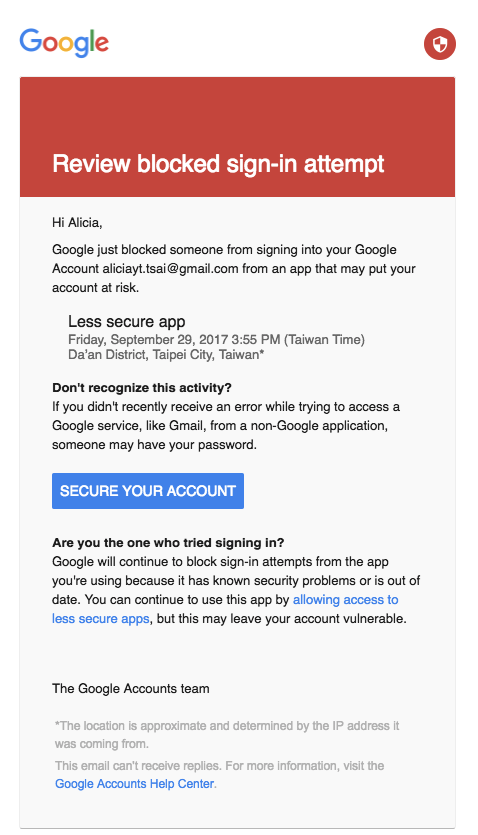
Allow less secure apps
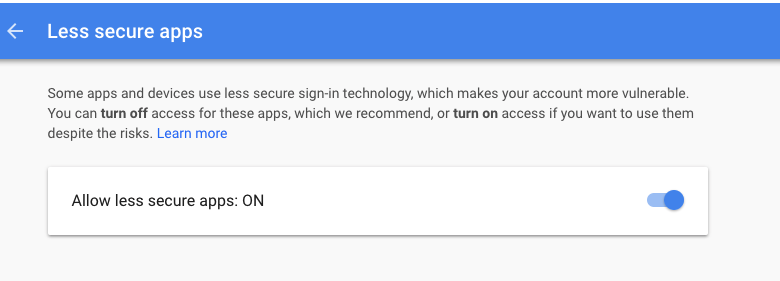
Send email again

Send email when the username changed
Expand index() view function to send email
- Add two template files to create plain text and HTML for the email.
- Store the two template files in a mail subfolder inside templates folder.
- Set recipient email to the FLASKY_ADMIN in the environment.
- Give user argument to the template for rendering.
Add FLAKSY_AMDIN to the environment
Mac OS X
(venv) $ export FLASKY_ADMIN=<Gmail username>
Microsoft Windows
(venv) $ set FLASKY_ADMIN=<Gmail username>
templates/mail/new_user.txt
In [ ]:
User {{ user }} has joined.
In [ ]:
<!-- templates/mail/new_user.html -->

<p> User <b>{{ user }}</b> has joined. </p>
In [ ]:
# hello.py

import os

from flask import Flask, render_template
from flask import session, redirect, url_for
from flask import flash
from flask_bootstrap import Bootstrap
from flask_mail import Mail, Message
#from flask.ext.mail import Mail, Message
from flask_script import Manager
from flask_wtf import FlaskForm
from wtforms import StringField, SubmitField
from wtforms.validators import Required

app = Flask(__name__)
app.config["SECRET_KEY"] = "hard to guess string"    # Important for CSRF token
app.config['MAIL_SERVER'] = 'smtp.googlemail.com'
app.config['MAIL_PORT'] = 587
app.config['MAIL_USE_TLS'] = True
app.config['MAIL_USERNAME'] = os.environ.get('MAIL_USERNAME')  # do not write information here directly
app.config['MAIL_PASSWORD'] = os.environ.get('MAIL_PASSWORD')  # do not write information here directly
app.config['FLASKY_MAIL_SUBJECT_PREFIX'] = '[Flasky]'
app.config['FLASKY_MAIL_SENDER'] = 'Flasky Admin <your-email@example.com>'
app.config['FLASKY_ADMIN'] = os.environ.get('FLASKY_ADMIN')   # do not write information here directly
app.config['DEBUG'] = True

manager = Manager(app)
bootstrap = Bootstrap(app)
mail = Mail(app)
In [ ]:
class NameForm(FlaskForm):
    name = StringField("What is your name?", validators=[Required()])
    submit = SubmitField("Submit")

def send_email(to, subject, template, **kwargs):
    msg = Message(app.config['FLASKY_MAIL_SUBJECT_PREFIX'] + subject,
                  sender=app.config['FLASKY_MAIL_SENDER'], recipients=[to])
    msg.body = render_template(template + '.txt', **kwargs)
    msg.html = render_template(template + '.html', **kwargs)
    mail.send(msg)

@app.route("/", methods=["GET", "POST"])
def index():
    form = NameForm()
    if form.validate_on_submit():
        old_name = session.get("name")
        if old_name is not None and old_name != form.name.data:
            send_email(to=app.config['FLASKY_ADMIN'], subject='New User',
                       template='mail/new_user', user=form.name.data)
        session["name"] = form.name.data
        return redirect(url_for("index"))
    return render_template("index.html", form=form, name=session.get("name"))

if __name__ == '__main__':
    manager.run()

Sending Asynchronous Email
- To aviod unresponsiveness when sending email, we can move the send function to a background thread.
Threading
- Responsiveness: Move long-running tasks to a worker thread that runs concurrently with the main execution thread for the application to remain responsive to user input while executing tasks in the background.
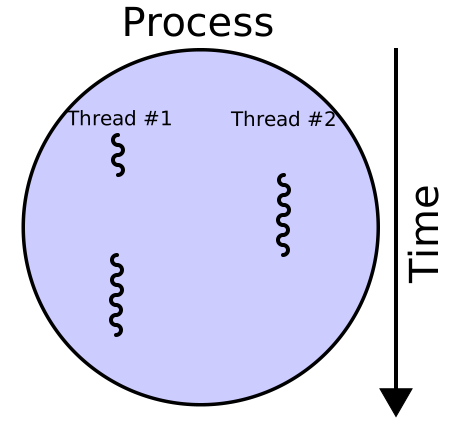
source: wikipedia
In [ ]:
# hello.py

from threading import Thread

def send_async_email(app, msg):
    with app.app_context():
        mail.send(msg)

def send_email(to, subject, template, **kwargs):
    msg = Message(app.config['FLASKY_MAIL_SUBJECT_PREFIX'] + ' ' + subject,
                  sender=app.config['FLASKY_MAIL_SENDER'], recipients=[to])
    msg.body = render_template(template + '.txt', **kwargs)
    msg.html = render_template(template + '.html', **kwargs)
    thr = Thread(target=send_async_email, args=[app, msg])
    thr.start()
    return thr
You can get the above code from github
$git clone https://github.com/win911/flask_class.git- Skip this if you have done it before.
$git checkout b95022
Appendix
Flask extension
Flask-JsonSchema
- JSON request validation for Flask applications
- Wraps
jsonschemapackage and integrates it with Flask
- Wraps
Installation
- $ pip install flask-jsonschema
Place schemas in the specified JSONSCHEMA_DIR
app.config['JSONSCHEMA_DIR'] = os.path.join(app.root_path, 'schemas')
In [ ]:
{
  "type": "object",
  "properties": {
    "title": {"type": "string", "maxLength": 50, "minLength": 10},
    "author": {"type": "string", "maxLength": 30, "minLength": 1}
  },
  "required": ["title", "author"]
}
In [ ]:
# hello_json.py

import os

from flask import Flask, request
from flask_jsonschema import JsonSchema, ValidationError

app = Flask(__name__)
app.config["JSONSCHEMA_DIR"] = os.path.join(app.root_path, "schemas")

jsonschema = JsonSchema(app)

@app.errorhandler(ValidationError)
def on_validation_error(e):
    return "error: {}".format(e)

@app.route("/books", methods=["POST"])
@jsonschema.validate("create_book")
def create_book():
    book_name = request.json["title"]
    return "[success] create book: {}".format(book_name)

if __name__ == "__main__":
    app.run()
In [ ]:
{
  "create": {
    "type": "object",
    "properties": {
      "title": {"type": "string", "maxLength": 50, "minLength": 10},
      "author": {"type": "string", "maxLength": 30, "minLength": 1}
    },
    "required": ["title", "author"]
  },
  "update": {
    "type": "object",
    "properties": {
      "title": {"type": "string", "maxLength": 50, "minLength": 10},
      "author": {"type": "string", "maxLength": 30, "minLength": 1}
    }
  }
}
In [ ]:
# hello_json.py

import os

from flask import Flask, request
from flask_jsonschema import JsonSchema, ValidationError

app = Flask(__name__)
app.config["JSONSCHEMA_DIR"] = os.path.join(app.root_path, "schemas")

jsonschema = JsonSchema(app)

@app.errorhandler(ValidationError)
def on_validation_error(e):
    return "error: {}".format(e)

@app.route("/books", methods=["POST"])
@jsonschema.validate("books", "create")    #
def create_book():
    book_name = request.json["title"]
    return "[success] create book: {}".format(book_name)

if __name__ == "__main__":
    app.run()
Validation success
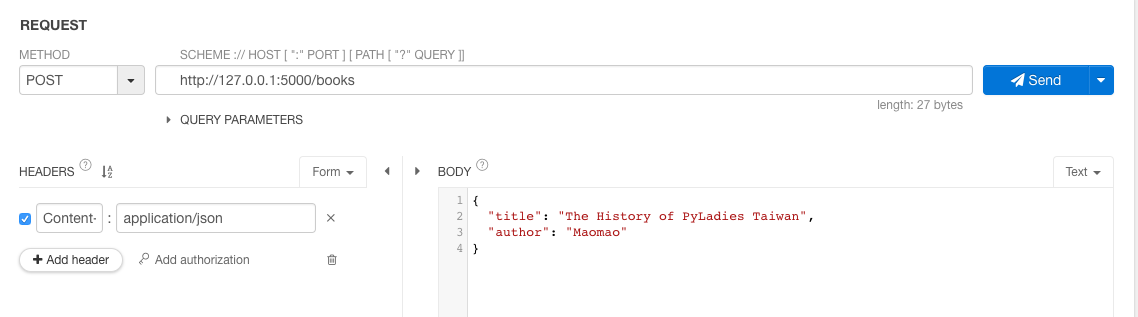
Validation fail: 'author' is a required property

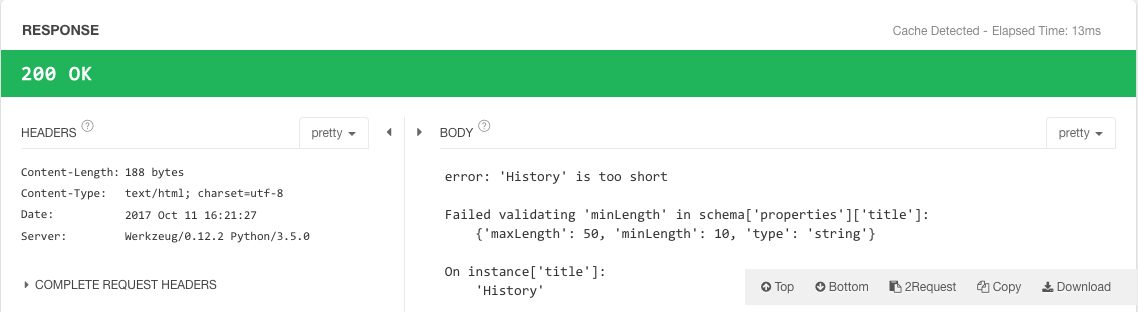
Validation fail: length of the value of 'title' is too short
You can get the above code from github
$git clone https://github.com/win911/flask_class.git- Skip this if you have done it before.
$git checkout 276c02
Watch out !
- flask-jsonschema only validate request.json
Validation fail: request.json is None

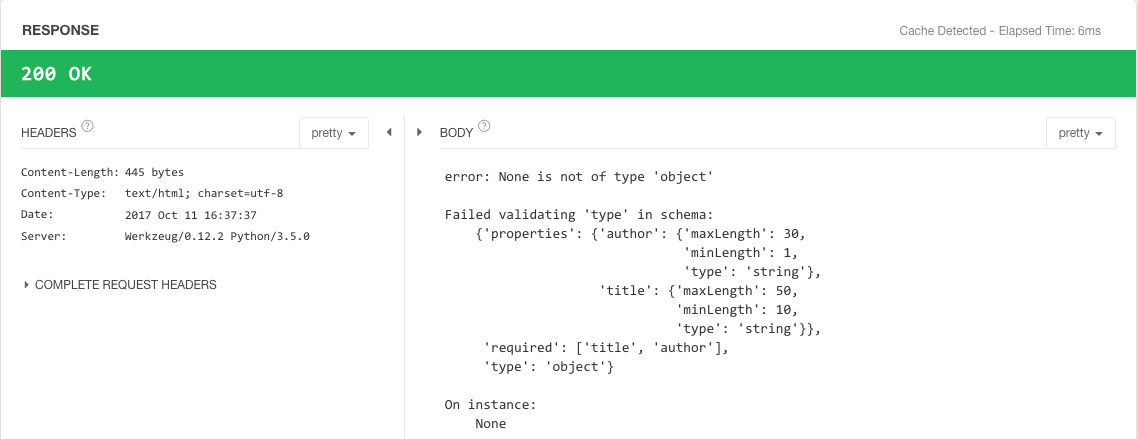
Use jsonschema package to validate both request.form and request.json
In [ ]:
# hello_json.py

import os

from flask import Flask, request
from jsonschema import validate, ValidationError

app = Flask(__name__)

schema = {
    "type": "object",
    "properties": {
    "title": {"type": "string", "maxLength": 50, "minLength": 10},
    "author": {"type": "string", "maxLength": 30, "minLength": 1}
    },
    "required": ["title", "author"]
}

@app.errorhandler(ValidationError)
def on_validation_error(e):
    return "error: {}".format(e)

@app.route("/books", methods=["POST"])
def create_book():
    if request.form:
        validate(request.form, schema)
        book_name = request.form["title"]
    elif request.json:
        validate(request.json, schema)
        book_name = request.json["title"]
    else:
        raise ValidationError("Invalid data format")
    return "[success] create book: {}".format(book_name)

if __name__ == "__main__":
    app.run()
Validation success: request.form
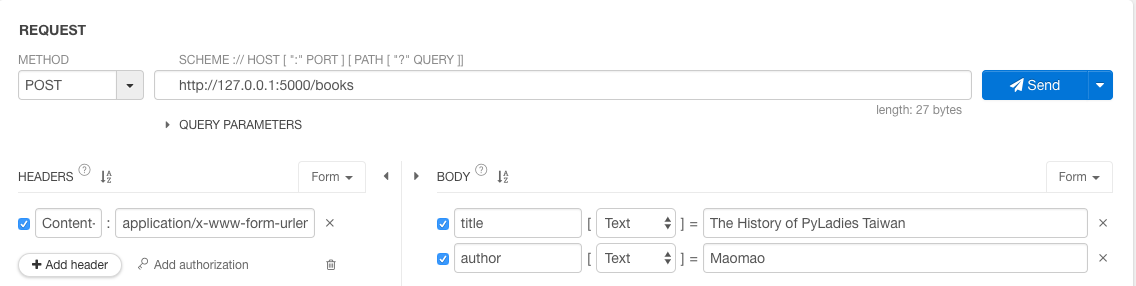

Validation success: request.json
Validation fail: invalid data format

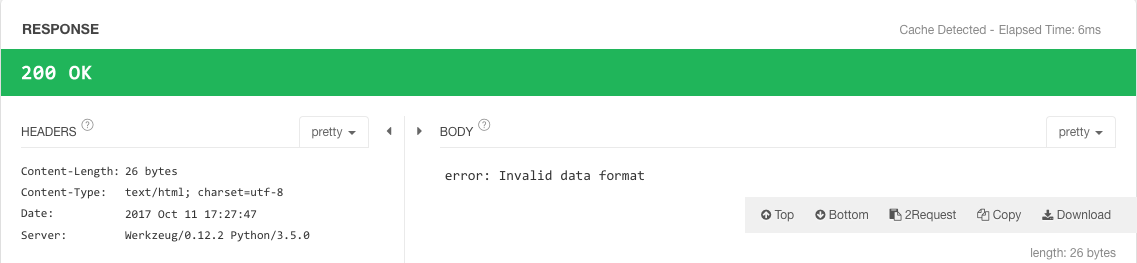
More information about JSON Schema you can refer to
You can get the above code from github
$git clone https://github.com/win911/flask_class.git- Skip this if you have done it before.
$git checkout 610782